

Get FP&A best practices, research reports, and more delivered to your inbox.
{callout}
TL;DR
- Vibe coding lets finance teams build interactive tools by describing what they want in plain English, no coding required.
- The bottleneck is no longer technical skill. It's having the right idea and knowing how far to take it.
- Some tools are great to vibe code (calculators, visualizations, one-off analyses). But for systems that run your business, trusted software still wins.
{/callout}
One year ago, Andrej Karpathy—co-founder at OpenAI—casually predicted the future of software development. Rather than coding applications from scratch, you could describe what you want to build in plain English, and the LLM would write the code for you.
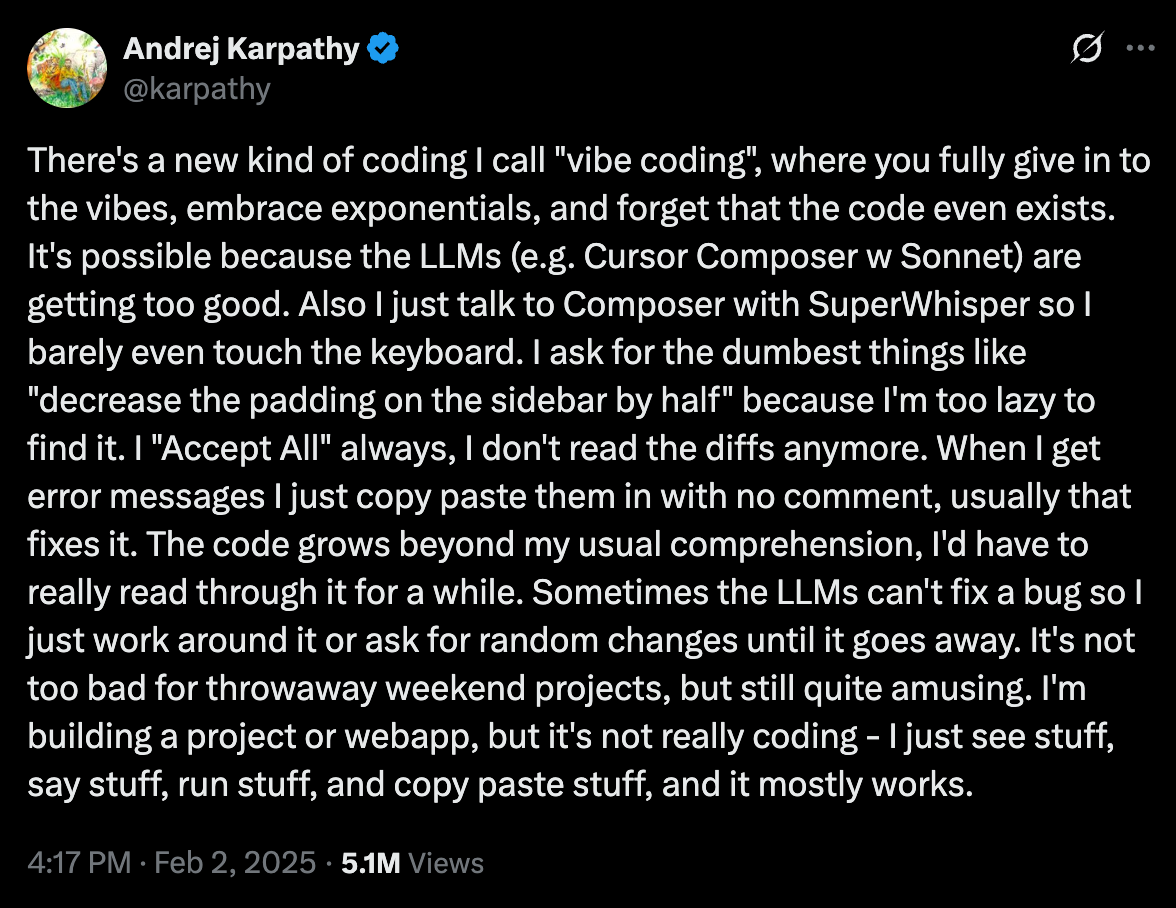
Few realized just how prescient that stream-of-consciousness tweet would turn out to be. New models like Claude's Opus 4.6 and OpenAI's GPT-5.3-Codex are making vibe coding far more accessible and effective—not just for engineers, but for anyone who can describe a problem clearly and iterate in plain English.
Finance teams may have been late to the AI party in 2023, but vibe coding gives them a chance to be early adopters of the next wave.
In our recent webinar, Vibe Coding in Finance, Aleph Co-Founder and CEO Albert Gozzi showed what's possible with these new tools—live, from scratch, in front of a several hundred finance professionals.
Vibe coding framework for finance teams
Let’s set the record straight off the bat: vibe coding is a powerful and exciting new framework, but it has limitations. You can’t vibe code a wholesale replacement of your tech stack, despite what the doomsayers are proclaiming amid the "SaaSpocalypse."
Albert has a three-part framework for deciding what you should and shouldn’t vibe code.

Level 1: Napkin math
This is the lowest-friction version of vibe coding. Open a chat, paste in some data, get something useful back. It doesn't need to be perfect—directionally correct prototypes are what you’re going for.
{callout}
Level 1 use cases: Quick variance checks, one-off data visualizations, sanity-checking a forecast before a meeting.
{/callout}
Level 2: Reusable tools
This is where things get interesting. Level 2 is the jump from "I used this once" to "other people use this."
The outputs need to be accurate enough to trust, polished enough to share, and persistent enough to revisit. These still don't need to be perfectly engineered tools, but they should be robust enough to work for different kinds of users.
{callout}
Level 2 use cases: Total comp calculators for recruiting, equity reconciliation scripts, pricing model analyzers, headcount planning tools.
{/callout}
Level 3: Production
When you need live data feeds from your ERP, audit trails, or always-on reliability, you've reached the limit of what a vibe-coded app can responsibly handle. Business-critical workflows are still the domain of trusted SaaS tools.
{callout}
Level 3 use cases: Automated reporting from QuickBooks/NetSuite/Oracle, board-ready forecasting connected to your CRM, investor reporting.
{/callout}
These levels should help you directionally understand how to categorize vibe coding opportunities.
But there’s an important nuance: these levels aren't just based on use cases—they're about how far you take any given idea. A variance analysis, for instance, can be:
- Level 1 (paste two columns into a chat, spot the differences)
- Level 2 (correlate with business drivers, pull in more granular data)
- Level 3 (auto-generated from your QuickBooks or NetSuite every month)
Same idea, three very different depths.
{{quote-1}}
Finance vibe coding in action: Forecast anomaly detector
Frameworks are nice. Seeing tools built in real time is better.
Here's a step-by-step look at how Albert built a forecast anomaly detector during the session—one of the most requested ideas from the 150+ submissions attendees sent in.
Step 1: Identify the problem
The scenario is familiar to anyone in FP&A: you've got a model, you're about to present it, and you want to make sure nothing looks off. The traditional approach is scrolling through rows of numbers and hoping your eyes catch the problem.
Step 2: Clean your inputs
This is the step most people skip, and it's probably the most important one. Albert doesn't dump the full three-statement model into Claude. He strips it down to just the P&L output, pastes values only (no formulas), and hides unnecessary columns.
Less noise in means better signal out. If there's one tactical habit to take from this demo, it's this: spend 60 seconds cleaning up your input before you prompt.
Step 3: Write your prompt
Notice how specific and simple the prompt is. He's not asking Claude to "analyze my financials." He's asking for one thing: a dropdown to select a metric, a chart to visualize it, and the ability to spot anomalies.
That specificity is what makes it work. And he's deliberately starting bare-bones—he can always iterate from here.
Step 4: Iterate
Within minutes, he's got a working app. And it's already earning its keep. How long would it have taken an analyst to spot that COGS jump from $94K to $250K in a spreadsheet?
There's always room for improvement. Maybe it's a different visualization, or keyboard shortcuts that improve navigability.
That's the vibe coding loop: build something minimal, see what's works and what doesn't, make it better.
How to start vibe coding
If you're watching from the sidelines, the barrier to entry is lower than you think. But there are a few things worth knowing before you dive in.
1. Build iteratively, not all at once
This is the single most common mistake people make with vibe coding, and with LLMs in general.
Each decision you hand off to the LLM has a small chance of going sideways. Ask for one thing, and the odds of a good result are high. Ask for a hundred things before checking in, and those odds compound against you fast.
Start with one thing. See if the output makes sense, then iterate accordingly.
2. The idea matters more than the tool
Claude, ChatGPT, Replit, Lovable, Cursor..all of them work well. The power comes from the underlying models, and those models tend to leapfrog each other every few months.
Don't agonize over which tool to use. Spend that energy on picking the right problem and writing a clear prompt.
3. Give the LLM clean inputs
A full three-statement model with formulas, hidden rows, and extra tabs is going to confuse an LLM. A clean P&L output with pasted values is going to get you something useful on the first try. 60 seconds of prep saves ten minutes of back-and-forth.
If you're not sure where to start, prompting well is half the battle. Our Finance AI Prompt Playbook has 15 ready-to-use prompts designed for finance teams—a good way to build the muscle before you start vibe coding your own tools.
The limits of vibe coding
Hopefully by now, you’re seeing the tremendous upside of vibe coding in finance.
But it’s also worth re-emphasizing that this approach has limitations. If you’re contemplating vibe coding your own CRM so you can cancel Salesforce, pump the brakes.
There's a difference between "I can build this" and "I should be the one running this." A finance pro hacking together a one-off tool is not the same as an engineering team maintaining a secure, scalable product built on the same AI foundations. The same models that enable vibe coding are also powering a new wave of purpose-built software, and they’re getting better by the day.
For now, vibe coding shines in quick-turn workflows: prototyping, exploring data, building throwaway tools that used to take an engineer and a two-week sprint. Workflows that actually run your business are still the domain of trusted software.
What are you waiting for?
The ceiling on what finance teams can build just got dramatically higher. Those who start experimenting now will lead the way in this new era of finance.
We only covered one of the several tools Albert vibe coded during the webinar. Check out the full replay to see the rest and get inspired for what you could vibe code yourself.
Get FP&A best practices, research reports, and more delivered to your inbox.
.png)