FP&A software comparison
Aleph vs. Adaptive

Verified G2 reviewers make it clear: Aleph is faster to implement, easier to work with, and built to support an AI-native finance function.

Trusted by industry-leading finance teams
G2 head-to-head ratings
Aleph vs. Workday Adaptive Planning
at a glance

Aleph users go live faster, realize ROI sooner, and get higher-quality support.
Every score below comes from verified G2 user reviews.

Aleph
Workday Adaptive Planning
Star rating
4.9
4.3
Time to go live
1month
5months
Time to ROI
4months
19months
Ease of Setup
9.3
7.6
Quality of Support
9.8
8.2
Ease of Admin
9.5
8.1
Good partner in business
9.9
8.5
Product Direction
9.9
8.8
Ease of Use
9.1
8.1
Meets Requirements
9.1
8.5
Source: G2, August 2026. Ratings from the Aleph vs. Workday Adaptive Planning comparison; time to go live and ROI from each product’s G2 profile.Read the full G2 comparisonBook a demo
Why Aleph?
Why finance teams choose Aleph
over Workday Adaptive Planning
Live in a month, not a quarter

Aleph connects to your systems and works on the models you already have. Most teams self-serve setup in days without any consultants, dev resources, or implementation fees.

Native Excel and Google Sheets

Finance keeps its Excel models. The rest of the business collaborates in Google Sheets. Aleph's add-ins are native in both, so you don't have to pick one or the other.

Drill down to transactions

Every number traces to the transactional level. Run cause of change on the spot and answer the follow-up in the meeting, not next week.

Beyond planning
A modern way to run FP&A

Aleph is built around the way finance actually works across spreadsheets, systems, and AI tools.

Watch a full demo
Support
Dotted grid
Support

World-class customer support

Every Aleph customer gets a dedicated Slack or Teams channel with experts who know their data, deadlines, and workflows.

Skip the ticket queue and get help from a team that understands how your finance team actually works.
AI
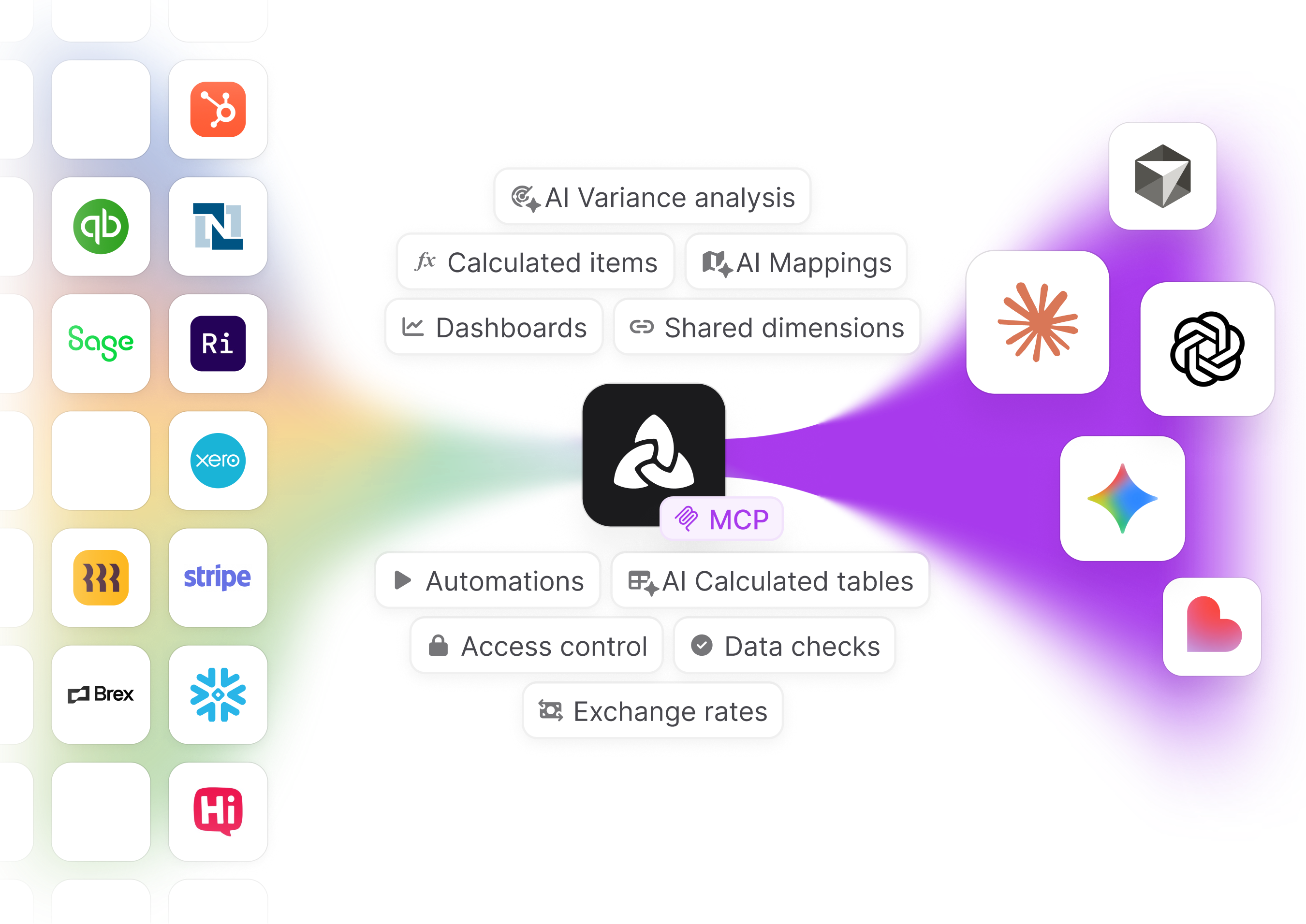
Aleph connected to finance and business app icons, feeding live data to AI tools
Dotted grid
AI

Live financial data that feeds your AI tools

Aleph connects Claude, ChatGPT, Cursor, and other AI tools to your governed financial data via MCP.

Instead of uploading CSVs or re-explaining your business context all the time, your AI tools can work with your live numbers.
Integration
Dotted grid
Integration

Runs alongside Adaptive

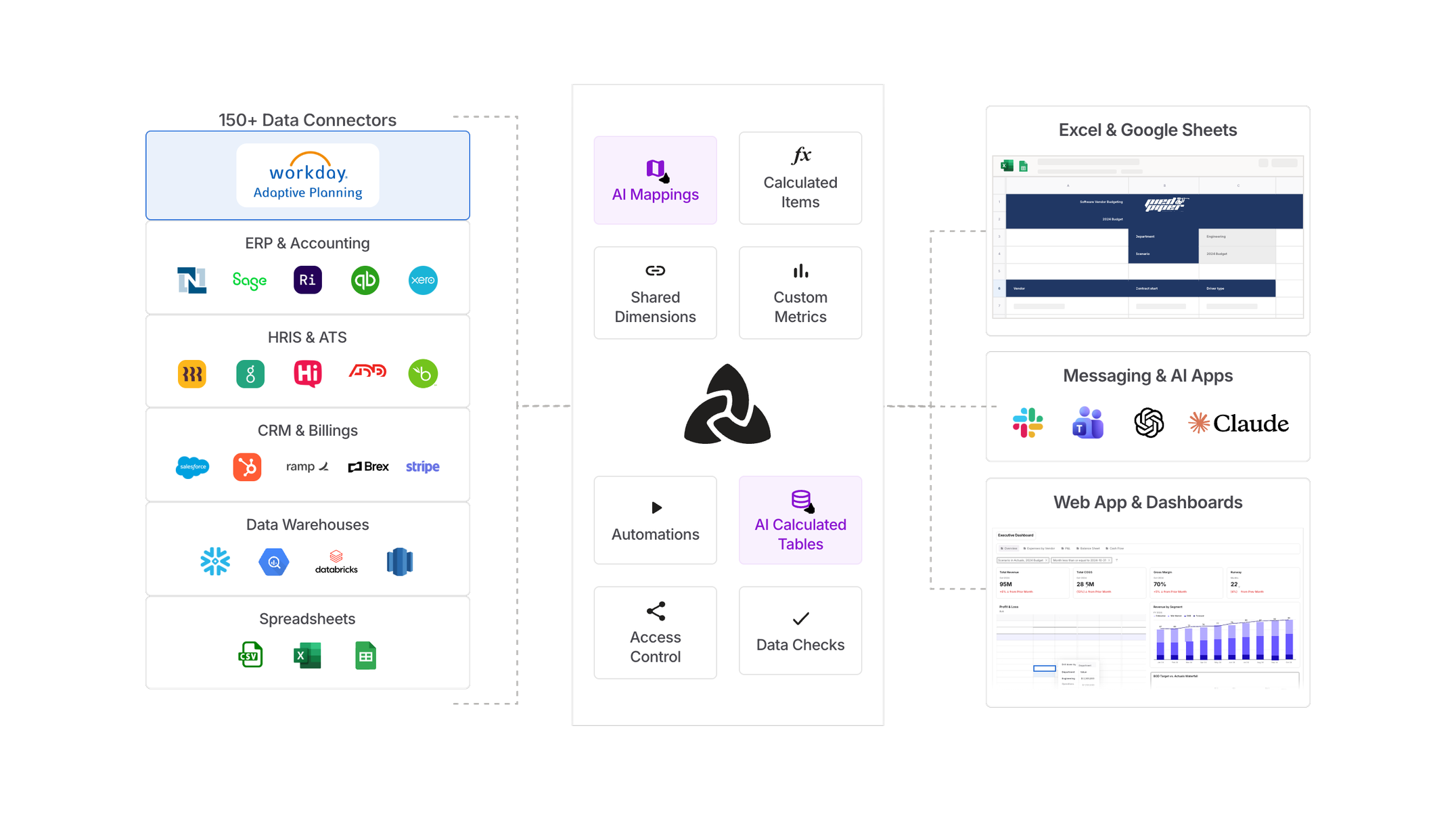
Aleph can be integrated with Adaptive to augment and enhance its product gaps.

But once dual customers get their hands on Aleph, it almost always ends in "we should just fully switch to Aleph when our Adaptive contract ends."

Why teams switch
Hear from those who switched
Real quotes from finance teams who switched from Adaptive to Aleph.
“Adaptive is really only an FP&A tool… one of the reasons we loved Aleph was being able to leverage AI and have this data layer for the business to be able to access.”
Real users, real results
Finance teams love Aleph

Join hundreds of industry-leading finance teams that love and trust Aleph.

Don’t just take our word for it; read what they have to say.

"We were live and answering board questions with confidence within two weeks. Aleph lets us see financial data from seven different accounting systems in a uniform way."

Jonathan Hardy
VP of Finance

"It will genuinely change the hiring needs of your finance team. An insanely ROI-positive investment."

Peter Brock
Strategic Finance

Aleph’s flexibility lets us slice and dice data across multiple dimensions faster than our source systems. It’s a game changer for how we collaborate and make decisions. If I were ever to leave Zapier, I’d have to take Aleph with me.

Miranda Conley
Senior Director of Accounting
Case Study

"Aleph has been a game changer for us. We've gone from tracking 10 to 15 drivers of our forecast model to now something like 50."

Chuck Fisher
CFO
Case Study

"For me, Aleph is an FP&A analyst. It lets me replace a full-time resource I'd otherwise have to hire."

Mike Russo
VP of Finance
Case Study

The first two years, finance was seen as a gatekeeper. Now, with Aleph, we’re viewed as trusted partners who bring insights in real time. That’s priceless.

Omar Asghar
Director of FP&A
Case Study

"It adapts to the way we work, rather than forcing us to adapt to it. I don't see myself using another FP&A tool ever again."

Nick Zaharchuck
Head of FP&A

"The only tool I've seen that plugs into Excel and Sheets the way it does — and you can self-drive implementation, without consultants."

Katharine Adame
Director of Strategic Finance

The Aleph team has gone above and beyond—clearing the bar by a mile. They’ve shown up for us at all hours and treated us the way we’d want to treat ourselves. It’s been a truly great partnership.

Bryce Heinz
CFO
Case Study

"We started demoing Aleph in nearly every finance pitch, and our win rate went up."

Chris Mossa
CEO
Case Study

"Having our data and forecasts at our fingertips in Excel was why we loved Aleph. Now that work is shifting to the agentic world, Aleph MCP unlocks a whole new level of productivity — and a new way to operate."

Axel Amar
SVP of Finance

"We're not adding headcount just to pull reports or maintain infrastructure. We can lean on Aleph to do that and focus on hiring for value — where we can drive decision-making."

Chris Brubaker
SVP of Finance
Case Study

"Aleph lets us build data pipelines from NetSuite and Redshift and put that data directly into the hands of our analysts and non-technical staff. It's flexible and truly self-serve."

Jonathan Geraci
Senior Director of Finance

"What used to take a day and a half is now automated with Aleph — it now takes maybe 20 minutes. This has been absolutely huge for us."

Ariana Egli
Senior FP&A Manager
Case Study

"Aleph has totally revolutionized the way that we do FP&A at AllCloud."

Ryan Freudenburg
Director of FP&A
Case Study

"You weren't kidding when you said it's plug-and-play and you immediately play. We were up and running in the same week."

Connie Ho
Sr. Finance Manager
Case Study

"Aleph changed our processes from messy, tedious, and error-prone to smooth and streamlined. We can get answers immediately."

Ani Kochiashvili
Finance Technology Lead
Case Study

"We moved all our financial reporting to Aleph. Our Excel reports now update in seconds. There's a before and after in the way we work."

Sergio Prada
FP&A Director
Case Study

"Our ability to access, analyze, and model our data has dramatically improved. Tasks that once took days now take a few hours."

Yazmi Miah
Strategic Finance & Business Operations
Case Study

"On the spectrum of FP&A tools out there, Aleph is the most user-friendly one I've come across."

Jon Gross
CFO
Case Study

"What was our process before Aleph? I don't even like to think about that anymore. It gives me the shakes."

Johnnie Walker
Director
Case Study

"I've been born and bred in FP&A for almost 20 years, and kudos to Aleph for building the tool I've always wanted."

Brandon Sullivan
CFO
Case Study

"Aleph ties our whole finance stack together — financial data, headcount, and hiring pipeline all flow into one place automatically. It's fast to set up and genuinely changes how you work day to day."

Shane Crowley
Strategic Finance
FAQ
Aleph vs. Workday Adaptive Planning FAQs
Implementation, spreadsheets, drill-downs, AI, support, and what it actually takes to switch.
How long does Aleph take to implement compared to Workday Adaptive Planning?
On G2, Aleph customers report going live in an average of 1 month, vs. 5 months for Workday Adaptive Planning. Aleph is designed to connect to your existing systems and work with the models you already have, so teams can start getting value without spending months rebuilding their workflows in a new planning environment.
Do we have to replace Workday Adaptive Planning to use Aleph?
No. Aleph can run alongside Adaptive, so you can start with the workflows creating the most friction and expand from there.
How does Aleph work with Excel and Google Sheets compared to Workday Adaptive Planning?
Aleph works natively in both Excel and Google Sheets, letting finance keep its existing models connected to live data, refresh them, and drill into underlying detail without moving the work into a separate planning environment. Workday Adaptive Planning also supports Excel and Google Sheets, but its spreadsheet tools are built around reports connected back to the Adaptive Planning model. Its OfficeConnect and Excel Interface products also require Windows and do not support Mac.
Can Aleph and Workday Adaptive Planning both drill down to transactions?
Yes. Both platforms support drill-downs, but the workflow is different. With Aleph, you can double-click a number in Excel or Google Sheets and inspect the underlying data without leaving the spreadsheet. Workday Adaptive Planning also supports drill-downs, but its Explore Cell workflow opens the detail in Adaptive Planning—for example, Google Sheets opens it in a new browser window.
How does Aleph’s AI compare to Workday Adaptive Planning?
Aleph is AI-native across the entire finance workflow, not a feature added onto a planning tool. Aleph Agent works on the same governed financial data wherever your team already is—the web app, Excel and Google Sheets, Slack or Teams, and external assistants like Claude, ChatGPT, and Cursor through Aleph MCP—and every answer traces back to the underlying transaction.

Workday Adaptive Planning has announced its own AI over the past year, including Adaptive Decision Intelligence, a planning agent, and an MCP server, though these are largely scoped to the Adaptive environment and still rolling out to customers.
What does support look like after we go live?
Every Aleph customer gets a dedicated Slack or Teams channel with experts who understand their data, deadlines, and workflows, plus ongoing office hours as the team’s needs evolve. Workday Adaptive Planning routes product support through designated Named Support Contacts and the Workday Customer Center. On G2, Aleph scores 9.8 for quality of support vs. 8.2 for Workday Adaptive Planning.
The next era of FP&A

Move from legacy planning to AI-native FP&A

Add an AI-native finance layer to the models and systems your team already knows.
Screenshot of an income statement spreadsheet comparing revenue, cost of revenue, and operating expenses for Jan 25 and Feb 25, alongside a sidebar menu with options including 'Income Statement,' 'Analyze with AI,' and other budget categories.
Dotted grid